Using the Azure Run As Account in Azure Automation to Connect to Azure AD with a Service Principal
If you are using Azure Automation and working with Runbooks for automating against your Azure subscription, you can create an Azure Run As Account for authenticating and logging in to your subscription. The Azure Run As Account is configured in your Automation Account, and will do the following:
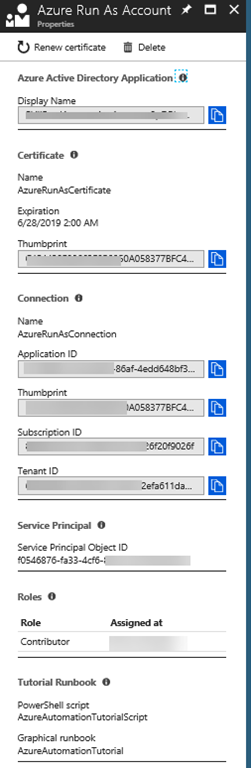
- Creates an Azure AD application with a self-signed certificate, creates a service principal account for the application in Azure AD, and assigns the Contributor role for the account in your current subscription.
- Creates an Automation certificate asset named AzureRunAsCertificate in the specified Automation account. The certificate asset holds the certificate private key that’s used by the Azure AD application.
- Creates an Automation connection asset named AzureRunAsConnection in the specified Automation account. The connection asset holds the applicationId, tenantId, subscriptionId, and certificate thumbprint.
You can read more about setting up Azure Run As Accounts here, including how to do a more customized setup with PowerShell: https://docs.microsoft.com/en-us/azure/automation/automation-create-runas-account . Something worth noting is that this Azure Run As Account will by default have the Contributor role to your entire subscription, so it would make sense to look into changing RBAC settings for the subcription or resource groups if you want to limit that. Also, all users that have access to the Automation Account will also have the opprotunity to use this Azure Run As Account. Having said that, the Azure Run As Account is a great way to authenticate securely with certificates and a service principal name without needing to store a username and password in a credential object. So I thought, wouldn’t it be great if we could use this same Azure Run As Account to log in to your Azure AD tenant for the possibility to run Azure AD PowerShell commands? The reason I thought of this is because of this article showing how to authenticate with Azure AD v2 PowerShell and Service Principal: https://docs.microsoft.com/en-us/powershell/azure/active-directory/signing-in-service-principal?view=azureadps-2.0 . In this short blog post will show you how to do this.
Getting the Azure Run As Account details
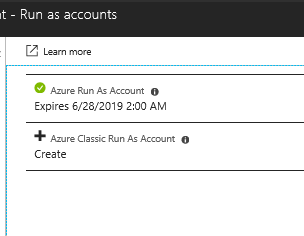
First, look into your Automation Account and Account Settings to find any Run as accounts:
Creating a Runbook that Authenticates with Service Principal to Azure AD
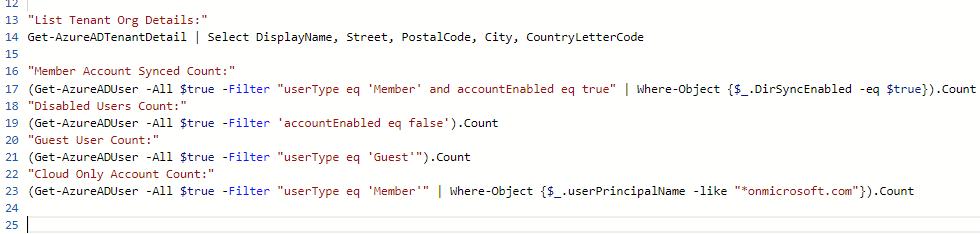
Now, let’s create a PowerShell runbook using the Azure Run As Account for connecting to Azure AD.
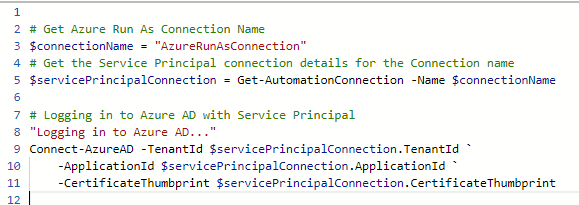
First, I set the connection name “AzureRunAsConnection”, and then save that as a variable for holding my service principal details using the Get-AutomationConnection cmdlet.
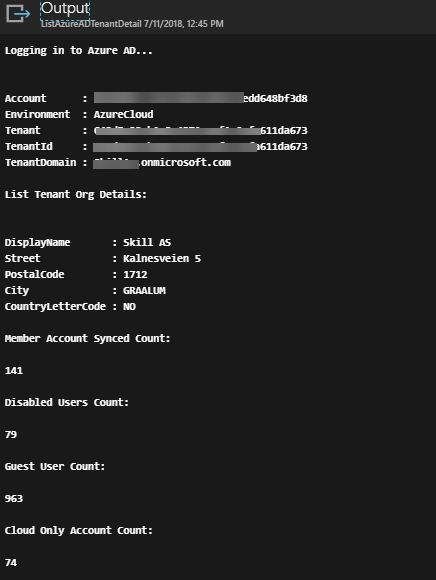
Then, logging in to Azure AD is done with specifiying TenantId, ApplicationId and CertificateThumbprint parameters, as shown below:
Role Permissions for the Service Principal
Depending on what kind of automation you want to do against Azure AD, especially if you want to write data, you will have to add the Service Principal to an Azure AD Role. Here is a couple of examples, using the object id for the service principal I told you to note earlier from the Azure Run As Account:
| |
That concludes this short blog post, hope it has been helpful! Thanks for reading and remember to share if it was useful 